Transcribe lyrics in Trove with local AI or your API
Trove can turn a local recording into a draft with words and estimated times for each word. It can help when a live version, a rare track or your own recording has no online lyrics. Transcription and alignment are experimental Trove Pro Supporter tools. Supporter is a one-time purchase that includes Pro. The U.S. price is $24.99. Check your local App Store for pricing and availability.
Have the words already? Search for available lyrics in Trove, import an LRC or TTML file, or set the times yourself with the free line-by-line LRC Maker or Word-by-Word LRC Maker. In-app tap-to-time editing is a Pro feature.
Before you start
- Use audio that is available locally in Trove. If you play from a network source, get a local copy first. The audio tools support native editing formats. For APE, DSD and other extended playback formats, convert a copy to a supported format such as WAV before using the tool.
- For on-device transcription, allow about 190 MB for the model and some additional space for processing. You need a connection to download the model once.
- For the optional remote path, bring your own service and API key. Check that the audio model returns word-level timestamps.
The steps show the iPhone layout in Trove 2.8.
On-device transcription
- In Songs, open the song’s … menu. Choose Audio Tools (Experimental), then Transcribe Lyrics (Experimental).
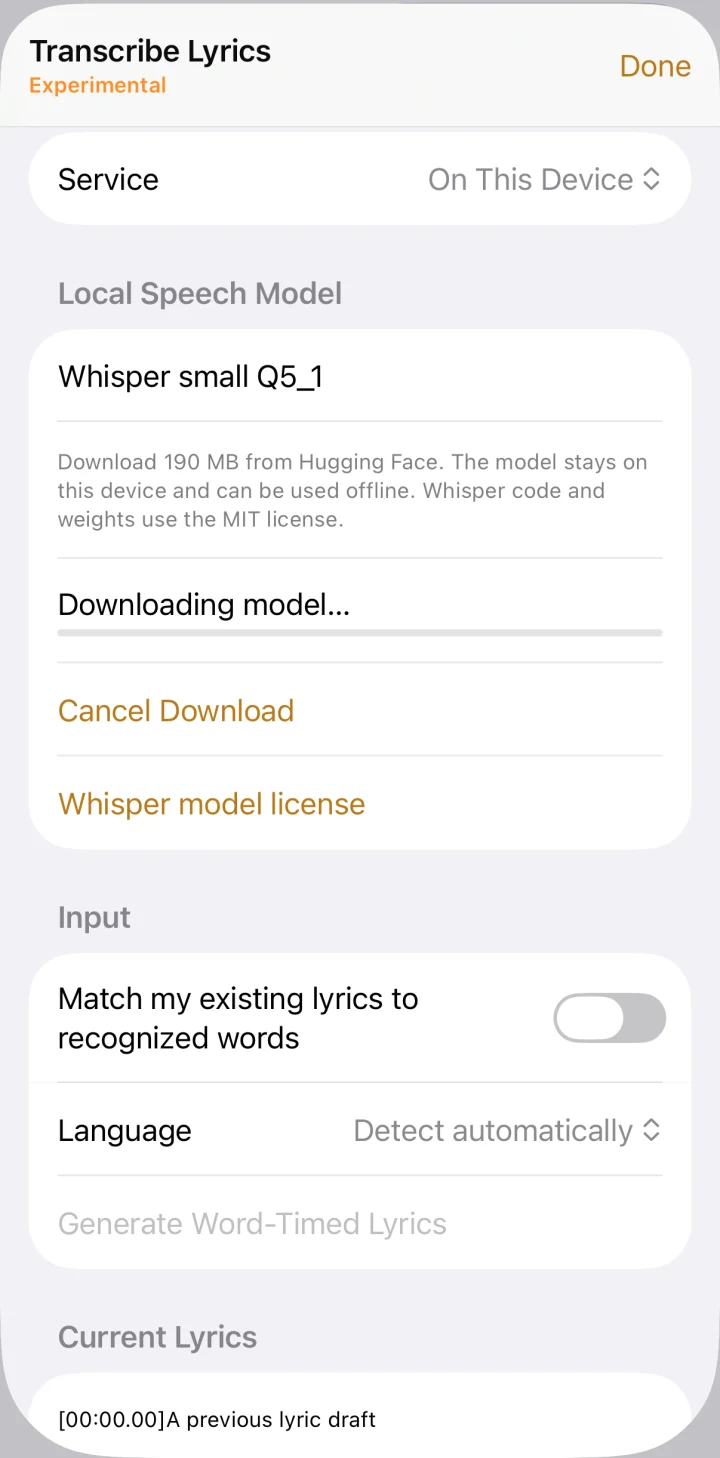
- Under Transcription Service, keep On This Device selected. Tap Download Local Model if prompted. Trove shows download progress and verifies the Whisper small Q5_1 model. Use Cancel Download to stop and try again later. When you see Local model ready, the model can run offline.
- Under Input, choose the song’s language if you know it, or leave automatic detection on. Tap Generate Word-Timed Lyrics and wait for processing. Use Cancel if you need to stop the run.
- If you already have text and need timing, turn on Match my existing lyrics to recognized words and check the supplied text. The app times words found by recognition. Any words it cannot match need manual review and timing.
Optional remote transcription with your API
- Go to More → AI to open AI Settings. Turn on Use cloud AI as fallback to show the fields. Enter your provider’s API Key and Base URL, then tap Save. Paste the key only in the app. The app stores it in the system Keychain. This setting also enables optional remote text features, so review their description before using them.
- Open Transcribe Lyrics for the song again. Change Service to Compatible Remote Audio Service. Verify the audio service URL and enter an Audio transcription model separately. The provider must support audio/transcriptions with verbose_json and word timestamps. A chat-only service or a response with only segment times cannot complete this workflow. Use the compatibility switch after you’ve checked support.
- Enter the clip’s start and end in seconds. Trove prepares a metadata-free mono copy of up to 120 seconds and 25 MiB. Tap Prepare Clip and Review Upload.
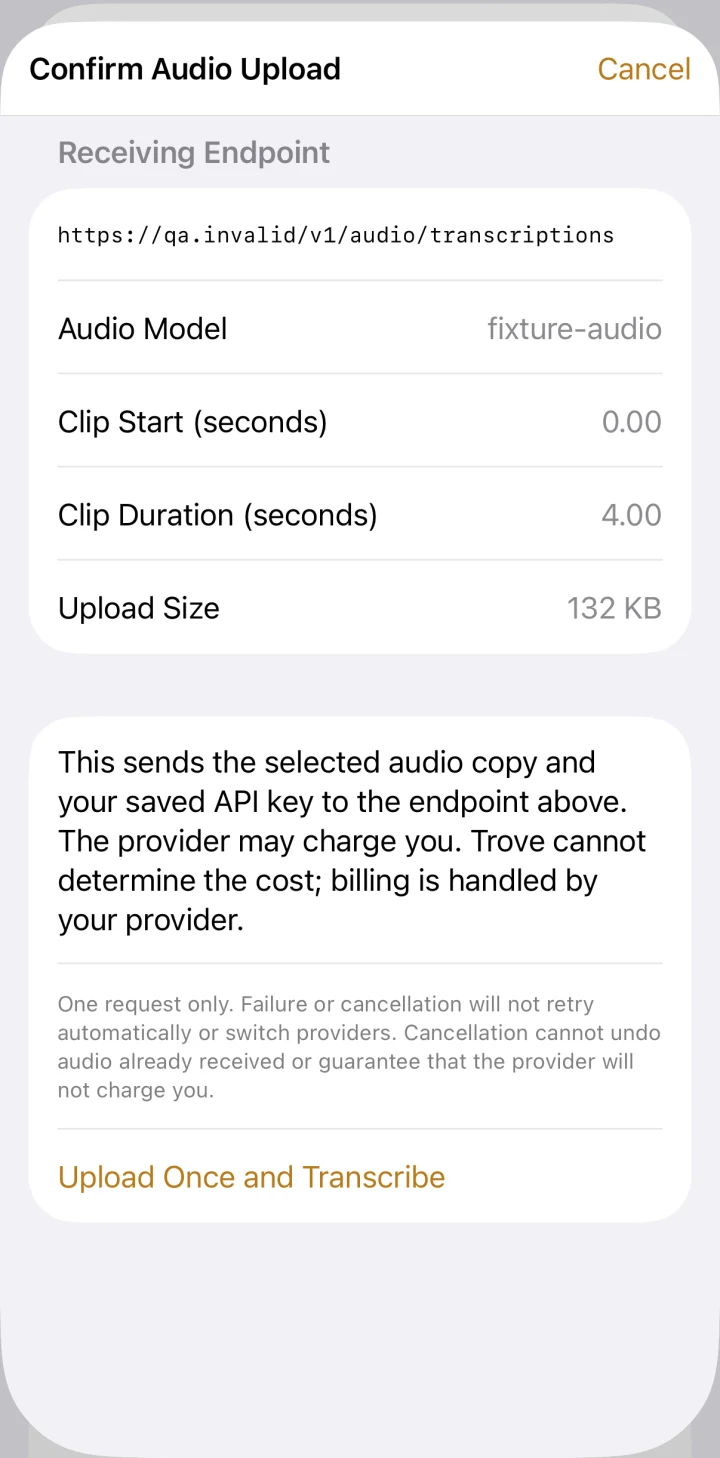
- In Confirm Audio Upload, check the receiving endpoint, the audio model, the clip start and duration, and the upload size. Choose Cancel if anything is wrong. Upload Once and Transcribe sends the selected copy and your saved API key directly to the displayed endpoint. Your provider may charge you. Trove supplies no API credit.
Review, save and check playback
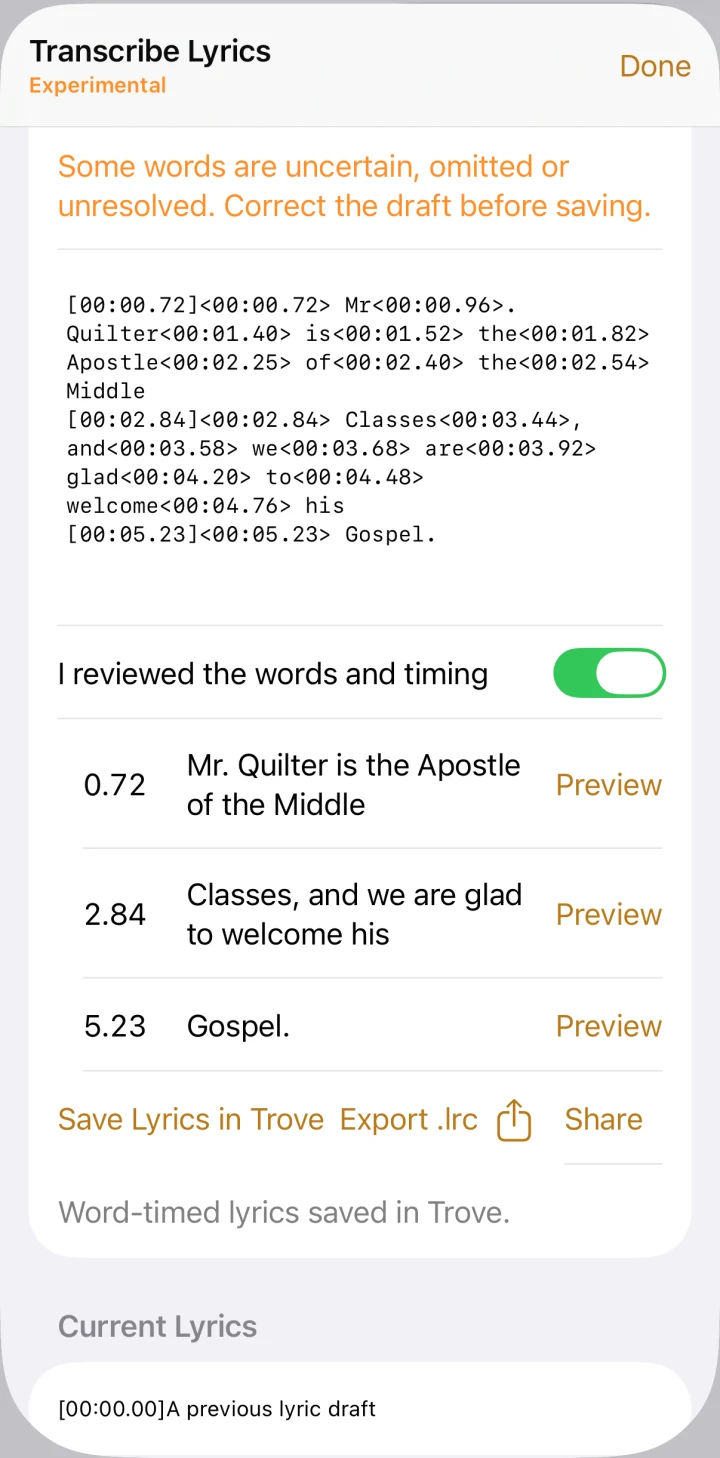
- In Review Word Times, compare the draft with Current Lyrics if the track already has lyrics. Use Preview to hear a section. Correct words and timestamps in the draft. If prompted, turn on I reviewed the words and timing once you’ve checked both.
- Choose Save Lyrics in Trove to use the draft in the library. If Replace current lyrics? appears, choose Save only after comparing the two versions. The original audio, tags and sidecar lyrics stay as they were.
- Choose Export .lrc to keep a separate Enhanced LRC file. In the app the export saves a copy, so you can keep your current lyrics and still take the draft with you. Play the track and open the lyrics view to check that the words highlight at the intended times. For more manual editing or imports, use the song’s Edit Lyrics… action.
Recognition can miss or invent words in singing, rap, choirs, music with heavy reverb, and recordings in different languages. In one public-domain Caruso sample, 10 edits were needed across 14 reference words, a 71.43% word error rate. The timed LRC still parsed. Listen for accuracy even when the time markers are valid.
If a step fails
- Model download or verification failed. Check your connection and available storage, then return to Download Local Model and try again. Long recordings also need temporary space. If a local run fails, your audio stays on the device.
- Few usable words or inaccurate timing. Try a recording with clearer vocals and less accompaniment, choose the language if known, or use the manual LRC tools. If matching existing lyrics, fill in unresolved word times before saving.
- Remote clip rejected. Check the clip length, the HTTPS base URL, the audio model and the key. The URL must be free of credentials, query parameters and fragments. If the provider returns no word times, choose one that supports them. For timeouts, authentication or quota errors, check the provider’s status and billing before retrying.
- You want to return to local processing. Choose On This Device. Trove never switches to cloud processing when a local run fails. Failed or cancelled uploads do not retry automatically. If you cancel after sending, the provider may already have received the clip and may still charge you.
- You want to keep your current lyrics. Cancel replacement. Export the draft to a separate file once you’ve reviewed it.
Privacy and related guides
On-device transcription processes your audio on your device. On the remote path, Trove sends the selected audio copy only after you confirm it. The receiving service handles it under its own privacy and billing policies. Keep credentials out of screenshots and shared material. Trove’s app privacy policy
See Trove’s features, the FAQ, the Trove 2.8 release notes and the LRC format guide. Get Trove on the App Store
Try Trove on your own library
Trove plays FLAC, ALAC, APE and DSD on Mac, iPhone and iPad. With Pro, those devices can browse a NAS over WebDAV or SMB. Apple Watch plays transferred songs offline, not from the NAS. Free to download; Pro is one $9.99 purchase across your devices.