Evermusic Alternatives for iPhone (2026)
Prices, ratings and advertising disclosures on this page come from the US App Store listings and were checked on the date above. They change — check the listing before you buy anything, ours included.
Most people looking for an Evermusic alternative are not unhappy with the playback — they are unhappy with the ads, or with the price of removing them: $1.99 a month, $12.99 a year, or $59.99 once. The honest options in 2026: Flacbox if you only want a different skin (be warned, it's the same developer), Doppler if you want a beautiful one-time purchase and never touch a NAS, foobar2000 if you want free and do not care how it looks, and Trove — ours — if you want WebDAV and SMB without a subscription and with a Mac app from the same purchase. Below is each one, with the numbers, and with the part where ours is the weaker choice.
Why people leave Evermusic
Credit first, because it is deserved. Evermusic (EVERAPPZ SL) has been on the App Store since 2014, sits at 4.6 stars from more than 18,900 ratings, and was last updated in August 2026. It connects to more cloud services than anything else in this category — Dropbox, Google Drive, OneDrive, Box, Yandex, WebDAV, FTP, SMB — and the free tier really does play your music. If you have not tried it, it is a reasonable first stop.
The reasons people go looking anyway are consistent:
- It carries advertising. Apple's listing declares it under "Contains: Advertising". A music app that interrupts is a different kind of object from one that does not.
- Removing the ads is a subscription decision. Evermusic Premium is $1.99 monthly, $12.99 yearly, or $59.99 for the lifetime unlock (US prices, September 2026). The lifetime option exists, which is more than most, but $59.99 is a real number to weigh.
- It is a cloud player first. The design centres on remote services. If your library is simply on your phone and a NAS at home, a lot of the app is scaffolding you never use.
- There is no Mac app. Evermusic is iPhone and iPad. On the desktop you are back to whatever you were using before.
The alternatives, by what you actually want
If you want the same thing with different branding: Flacbox
Check the developer before you switch. Flacbox is also EVERAPPZ SL — the same company. It is positioned as the hi-res sibling: 4.6 stars from about 8,500 ratings, updated July 2026, and it also declares advertising. Premium runs $2.99 monthly, $19.99 yearly, $69.99 lifetime — ten dollars more than Evermusic for what is broadly the same engine with a different interface.
If your complaint about Evermusic is the interface, Flacbox is a genuine change. If your complaint is ads or the price of removing them, you are paying more to the same company for the same policy. Worth knowing before you spend an evening migrating.
If you want a beautiful one-time purchase: Doppler
Doppler (Brushed Type) is the design-led answer: $9.00 once, no advertising, 4.6 stars from around 1,500 ratings. It is the app most people mean when they say an iPhone music player can feel like a first-class Apple app.
Two things to know before you buy. It requires iOS 26 — if you are holding an older iPhone on an older OS, you cannot install it at all. And the iPhone app's most recent update was October 2025, roughly eleven months ago as of September 2026. That may simply mean it is finished; it is a fact worth checking against your own tolerance either way.
The bigger structural difference: Doppler has no WebDAV or SMB. It is built around getting files onto the device — from a computer, from Dropbox, from a download. If the reason you are on Evermusic is that your library lives on a Synology, Doppler does not replace it. And Doppler for Mac is a separate app with its own price; the iPhone purchase does not carry across.
If you want free and do not care about polish: foobar2000
The iOS build of foobar2000 is free, has no in-app purchases, and was updated in August 2026. It plays everything, weighs nothing, and looks like a utility from a decade ago because that is exactly what it is. For a phone that exists to play a folder of FLACs on a commute, it is hard to argue with. If you want album art, a library that organises itself, or synced lyrics, look elsewhere.
If you want a DSP chain and will pay upfront: Neutron
Neutron Music Player is $12.99 paid before you open it — no free tier, no trial. In exchange you get the most serious audio pipeline on iOS: 64-bit processing, a parametric EQ, crossfeed, and settings that assume you know what they mean. Its App Store rating is 3.96 from about 200 ratings, notably below the others here, and most of the criticism is about the interface rather than the sound. Buy it for the DSP; do not buy it expecting a pleasant library.
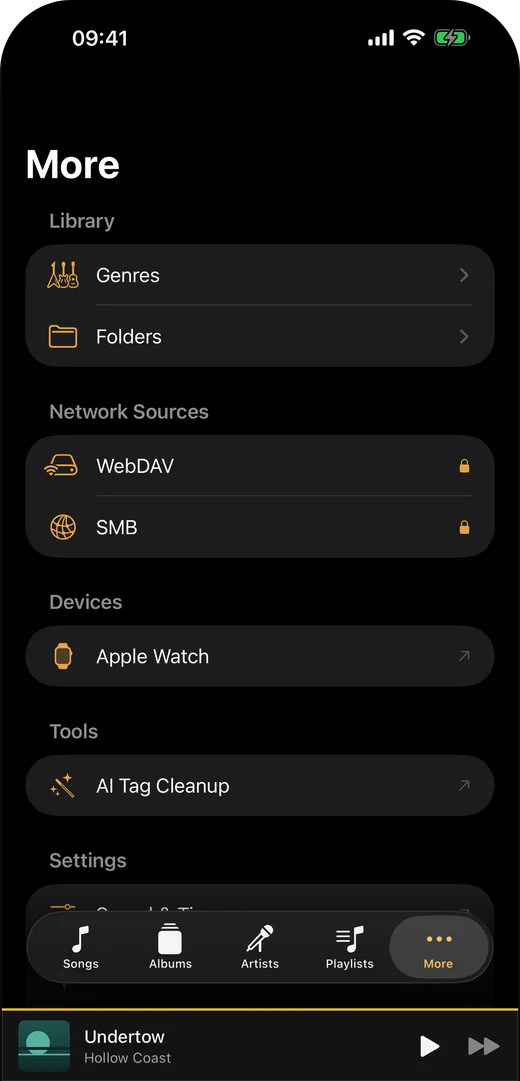
If you want network sources without a subscription: Trove
Ours. Trove is free to download, and the paid unlock is $9.99 once — no subscription tier, no advertising in any tier, and the purchase covers iPhone, iPad, Mac and Apple Watch from a single App Store listing because the entitlement is attached to your Apple Account rather than to a device.
What that buys, specifically: WebDAV and SMB network sources, Apple Watch sync, writing tags back into the files themselves, smart playlists, a floating desktop lyrics window on the Mac, and tap-to-sync lyrics editing. Everything else — every format from MP3 to FLAC, APE and DSD, gapless playback, a 10-band equalizer, playlists, the Files and Wi-Fi importers, synced lyrics display, CarPlay — is in the free app and stays there.
Where Trove is the wrong answer. It shipped in September 2026. Evermusic has eighteen thousand ratings and eleven years of edge cases behind it; we have neither. Evermusic also connects to Dropbox, Google Drive, OneDrive, Box and FTP — Trove does not, and if your library lives in a consumer cloud rather than on a WebDAV or SMB share, Evermusic is straightforwardly the better tool and you should stay. Trove also requires iOS 17 or later. And if you are happy with Evermusic's free tier and the ads do not bother you, nothing here is worth a migration.
The numbers, side by side
| Price to remove limits | Advertising | Network sources | Mac app | Rating (count) | |
|---|---|---|---|---|---|
| Evermusic | $12.99/yr or $59.99 once | Yes | WebDAV, SMB, FTP + clouds | No | 4.6 (18,900+) |
| Flacbox | $19.99/yr or $69.99 once | Yes | WebDAV, SMB, FTP + clouds | No | 4.6 (8,400+) |
| Doppler | $9.00 once | No | None | Separate purchase | 4.6 (1,500+) |
| foobar2000 | Free | No | Limited | Separate app | 4.5 (180) |
| Neutron | $12.99 upfront | No | Yes | No | 4.0 (200) |
| Trove | $9.99 once | No | WebDAV, SMB | Same purchase | New — few ratings |
US App Store, checked 8 September 2026. Prices and ratings move; the developer names and the advertising disclosures are from Apple's own listing pages.
How to move a library without losing anything
Whichever way you go, do this first:
- Find out where your files actually are. Evermusic can hold downloaded copies of cloud files. Those copies live inside the app and leave with it. Anything you care about should exist on your NAS, your computer, or in the cloud service itself before you delete anything.
- Check your play counts and ratings. If you have been rating tracks inside a player rather than in the file tags, that data usually does not travel. Write it into the files while you still can — Trove's tag write-back does this, and so do desktop tools like Mp3tag.
- Test one album before you move the whole library. Connect the new player to one share, play one gapless album end to end, and check that artwork and lyrics come through.
- Keep the old app installed for a week. Migrations always surface something on day six.
If you want the WebDAV setup written out step by step, that is here. If your library is on a NAS and you have not decided how to reach it at all yet, start here instead.
Try Trove on your own library
Free to download. $9.99 once for WebDAV, SMB, Apple Watch sync and four more — on Mac, iPhone, iPad and Apple Watch from the one purchase, and nothing renews.