WebDAV Music Player for iPhone and Mac
A WebDAV music player connects directly to your NAS or home server and streams your music files to your iPhone or Mac — no uploading your library to a third-party cloud, no monthly fee, and no re-encoding. If your collection lives on a Synology, TrueNAS, Nextcloud or any WebDAV-capable server, this is the cleanest way to carry thousands of albums in your pocket while the files stay on hardware you own.
Why stream over WebDAV instead of syncing?
A serious music library doesn't fit on a phone. Lossless rips run 20–40 MB per track, and a modest 500-album FLAC collection easily passes 150 GB. Syncing a subset means constantly managing what's on the device; uploading everything to a cloud locker means trusting a third party with your collection and usually paying forever.
WebDAV gives a compatible player access to files kept on your server over HTTPS when the endpoint is reachable. You can stream what you tap. If you want reliable offline listening, explicitly download a copy to the device; temporary playback prefetch is not an offline copy. Away from home, use a properly configured trusted HTTPS endpoint or a VPN.
What actually matters in a WebDAV music player
Having tested this workflow extensively while building one, these are the capabilities that separate a usable player from a frustrating one:
- Format support beyond MP3. If you keep a NAS library, odds are it's FLAC or ALAC — and maybe APE, OGG or DSD. The player must decode these natively rather than choking or transcoding.
- Real metadata handling. Tags, embedded artwork and lyrics should be read from your files and organized into albums and artists — not a bare folder listing.
- Gapless playback. Live albums and classical recordings fall apart without it.
- Explicit offline downloads. Flights and subways happen. Check whether the app can save selected files to its on-device library, not just buffer a playing track.
- A native app, not a web view. Battery life, background playback, AirPlay, lock-screen controls and Siri only work well in a real native app.
Setting it up (the short version)
- Enable WebDAV on your server. On a Synology NAS, install the WebDAV Server package and enable HTTPS (port 5006 by default). On Nextcloud, WebDAV is already on — your files URL is the endpoint. QNAP and TrueNAS ship WebDAV services in their control panels too.
- Add the server in your player. Enter the server URL, user name and password. A good player validates the connection and shows your folder tree immediately.
- Browse and play. The player streams tracks on demand. If you use Trove Pro, choose Download to Library for a song or Download All inside a folder, then verify it in the local library before going offline. The Synology NAS walkthrough shows the actual iPhone controls.
WebDAV vs a music server app (Plex, Navidrome)
There is another road to the same destination: run a dedicated music server such as Plex, Jellyfin or Navidrome on the NAS, and use its client app. Server apps add features WebDAV can't do — server-side transcoding, shared users, listen history — but they also add moving parts: another service to install, update and secure, and your playback depends on that service running.
The WebDAV approach is the minimalist's answer: your files sit in plain folders, the server does nothing but serve bytes, and all the intelligence — tags, artwork, playlists, lyrics — lives in the player on your device. If a serious player handles that intelligence well, most personal libraries simply don't need a server app. That is the bet Trove makes.
Where Trove fits
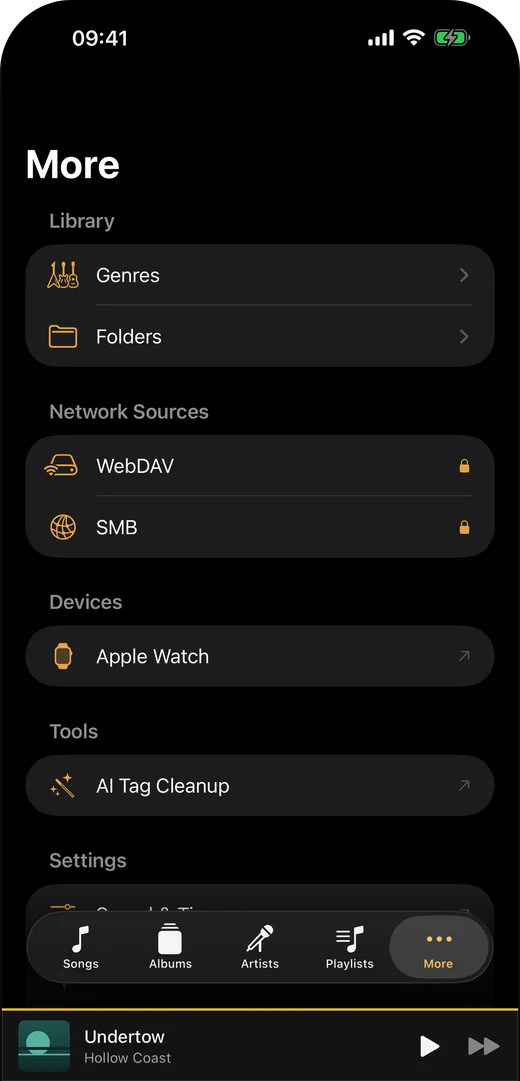
We built Trove Player for this workflow on Apple hardware. Its Mac, iPhone and iPad apps play FLAC, ALAC, APE, DSD and other formats. WebDAV and SMB network sources require Trove Pro, a one-time purchase, on those devices; local-file playback, gapless playback, the 10-band EQ and synced-lyrics display are free. Writing tags back to files is also Pro. Apple Watch plays transferred songs offline; it does not browse or stream from a NAS. Sending songs to the Watch requires Pro.
Since September 2026 Trove is on the App Store for Mac (macOS 14+) and iPhone, iPad and Apple Watch (iOS 17+) under one universal listing, not separate purchases. Add the WebDAV server separately on Mac and iPhone/iPad to access the same server files; this does not automatically synchronize each device's local library. The Mac app also has a menu bar mini player and media-key support; its floating lyrics window is Pro. Free to download.
The four things that actually go wrong
Almost every "WebDAV won't connect" thread comes down to one of these, in roughly this order:
- The URL is not the URL you think it is. WebDAV endpoints are rarely the same as the web interface address. On Synology the WebDAV service answers on its own port (5006 for HTTPS) rather than DSM's; on Nextcloud the endpoint is the
remote.php/dav/files/<username>/path, not the page you log into. Paste the browser address and it will fail with a misleading error. - A self-signed certificate. Enabling HTTPS with the certificate the NAS generated itself is enough for a browser you can click through, but a music player has no "proceed anyway" button. Use a real certificate — Let's Encrypt through your NAS's own panel is usually two clicks — or keep the share LAN-only over SMB.
- The port is not open to where you are. WebDAV over the internet needs the port forwarded or a VPN. This is the point where most people decide, correctly, that a VPN like Tailscale or WireGuard is less exposure than a port open to the world.
- Character encoding in filenames. Non-ASCII names — accents, Japanese, Cyrillic — occasionally survive the browser and break the player, or the reverse. If exactly one album refuses to load, look at its filenames before blaming the protocol.
Trove 1.6 also improves SMB indexing when one file denies permission, continuing past it and allowing retry. That is an SMB-side change, not a change to WebDAV endpoint or certificate requirements, and it cannot fix server permissions by itself.
What to keep local, and what to stream
Streaming is not all-or-nothing, and the useful setup is usually a mix:
- Stream the long tail: the albums you play a few times a year, the box sets, everything you would never fit on a phone. This is where the whole approach earns its keep.
- Download explicitly anything with a schedule attached — the commute playlist or album you need for a flight. In Trove Pro use Download to Library or Download All and confirm the local copy; playback prefetch alone is not enough. Do it on Wi-Fi the night before.
- Keep on-device the handful of things you want to work when the network does not exist at all. For Apple Watch, transfer songs to the Watch with Pro before a phone-free run; the Watch cannot connect to the WebDAV share.
A 16-bit FLAC runs roughly 0.4 GB per hour of streaming, so the arithmetic is simple: an hour of commuting each way, five days a week, is about 4 GB a week on cellular if you stream all of it and near zero if you cache the night before.
Frequently asked questions
Does streaming over WebDAV use a lot of data? A 16-bit FLAC streams at roughly 700–1000 kbps — about 0.4 GB per hour. On cellular, a player with offline caching lets you pre-download albums on WiFi instead.
Is WebDAV secure enough to expose to the internet? Over HTTPS with a strong password, WebDAV is as secure as any authenticated web service. Many users prefer to keep the server LAN-only and reach it through a VPN like Tailscale or WireGuard.
WebDAV or SMB — which should I use? SMB is fine on the local network; WebDAV works better across the internet because it's plain HTTPS. A player that supports both (as Trove does) lets you use SMB at home and WebDAV away.
Can I use the same server from a Mac and an iPhone? Yes. In Trove Pro, add the same WebDAV URL separately on Mac and iPhone/iPad; each can browse the same server files while connected. Their local libraries and downloads do not automatically sync. Apple Watch is different: it plays transferred songs offline and does not add a WebDAV server.
Does a WebDAV player work with cloud drives? Some, yes — anything that speaks WebDAV natively, which includes Nextcloud, ownCloud, Koofr, Box and several others. It is worth checking before you commit a library: the large consumer clouds mostly do not offer a WebDAV endpoint, which is exactly why a NAS remains the reliable answer.
Do tags and artwork come from the files or the server? From the files. WebDAV serves bytes and nothing else — no metadata database, no cover art API — so everything you see in the player was read out of the audio files themselves. That is why tag hygiene matters more in this setup than it does with a music server app, and why a player that can edit tags and write them back into the file saves real time.
Related guides & tools: How to play music from a NAS on iPhone (the step-by-step version, SMB included) · How to play FLAC on iPhone · FLAC vs ALAC · Free in your browser: Album Art Finder · LRC Maker
Try Trove on your own library
Trove plays FLAC, ALAC, APE and DSD on Mac, iPhone and iPad. With Pro, those devices can browse a NAS over WebDAV or SMB. Apple Watch plays transferred songs offline, not from the NAS. Free to download; Pro is one $9.99 purchase across your devices.